


Reno Gazette Journal
3.075.00 Reviews
App Specs
- Version
- 8.10.3
- Updated On
- License
- Free
- Downloads
- 10,000+
- Developer
- USA TODAY Co.
- Categories
- News & Magazines
- Platform
- Android
Screenshots


 Analysis by AppCompare
I approached Reno Gazette Journal as a focused way to keep up with news from Reno and the surrounding area, while still having access to broader national coverage. It is a free News & Magazines app from USA TODAY Co., and its purpose is easy to understand: bring reporting, photography, and video into one mobile reading experience. After spending time with it, I found that its value depends less on flashy extras and more on whether you want a local publication close at hand throughout the day.
The app is listed for Everyone 10+, which makes it suitable for a wide audience, although news content can naturally include serious or upsetting subjects. It has been available since May 3, 2012, and the current version is 8.10.3. That long presence gives it the feel of an established publication rather than a newly launched experiment, but the modest average rating of 3.0 from around 158 ratings is a useful reminder to keep expectations realistic.
How Reno Gazette Journal feels during ordinary reading
I judge a local news app not just by what it covers, but by whether I can make sensible choices as I read and whether I know when to pause before sharing personal details or spending money. In this section, I look at the everyday reading experience through that cautious lens. The next part turns to the controls and decisions a reader can actually assess while using it.
Speed expectations before you settle into a story
My first impression is that the app is best treated as a quick news doorway, not as a complete replacement for every source you use. The main appeal is convenience: instead of opening a browser, searching for the publication, and adjusting a mobile webpage, I can go directly into a dedicated reading space. That small difference matters when I want to check local headlines during a short break.
Speed in a news app is not only about how quickly the first screen appears. It also includes how easily I can move from a headline to the full article, return to the broader news view, and decide whether a video or photo-heavy report is worth opening. Reno Gazette Journal is most useful when I keep my session simple: scan the available stories, choose one, read it, and move on. That workflow feels more natural than trying to turn the app into a research database.
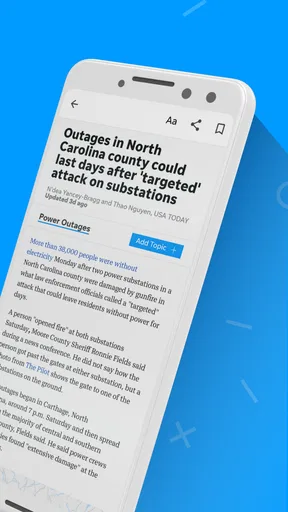
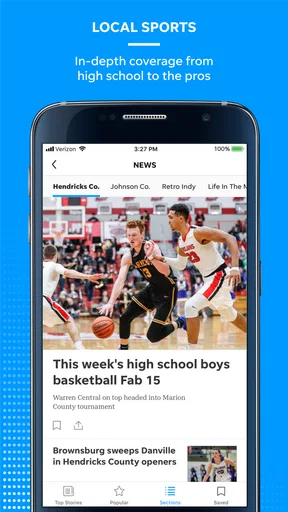
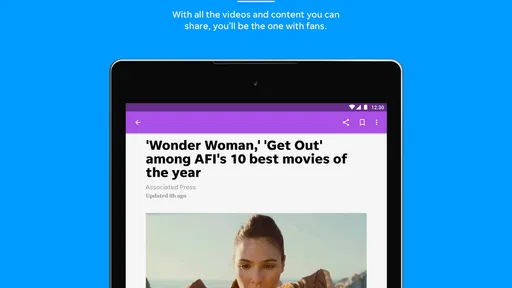
The visual side is important here. The publication puts real emphasis on photography and video, so the experience is not limited to blocks of text. A strong image can help me understand the setting of a local story immediately, while video can make a developing event easier to follow. The trade-off is obvious: richer media can require more patience than a text-only headline list, especially when I am using a weaker connection or an older device.
I would not choose this app when my only goal is the absolute fastest possible glance at breaking headlines from many different publishers. A general news aggregator can be more efficient for that. I see this app as a better fit when the Reno Gazette Journal’s local perspective is the part I care about, and I am willing to spend a little more time with the publication’s own presentation.
Worth Reading Before You Choose

EA SPORTS FC Mobile 26 Is a Bigger Football Game, but It Takes Time

Flipboard Shows What News Apps Must Do Beyond the Feed

Switching to Android Auto Means Rethinking Your Driving Routine

Google Calendar Makes a Crowded Week Easier to Manage

Ludo King Makes the Most of the Minutes Between Plans

Baby Panda World Brings Quick Play to Modern Phones, but Its Game Library Feels Busy
What happens during heavier reading sessions
A realistic everyday use case is a morning commute or a lunch break. I might open the app to check local developments, read one article about the community, watch a related clip, and then browse national stories before returning to work. That kind of mixed session is where the app makes the most sense. It gives me a single place to move between local relevance and wider context without having to maintain several separate news apps.
Heavy use changes the priorities. Reading one article is straightforward, but repeatedly opening media-rich stories can make the session feel more demanding than scrolling through a lightweight text feed. I pay closer attention to whether I am on mobile data, particularly when a story includes prominent photography or video. For anyone trying to conserve data, my practical advice is to use the app mainly for selecting stories and reserve longer video viewing for a dependable connection.
Another useful habit is to separate quick scanning from deliberate reading. I do a fast pass first, noting which stories actually affect my day. Then I return to the few that deserve attention. This avoids burning time on every headline and makes the app feel less cluttered, even when the news cycle is busy. It is a simple workflow, but it suits a publication-centered app better than endlessly refreshing a broad algorithmic feed.
The app can also be useful for people who want local reporting without constantly checking social platforms. Social feeds may surface a developing event quickly, but they can mix commentary, repetition, and incomplete context. Reno Gazette Journal offers a more focused route into the publication’s reporting. I still would not rely on one source for a major emergency or fast-changing situation; checking official local alerts and other reputable outlets remains sensible.
Reliability, recovery, and the cost of interruptions
For me, reliability means more than whether an app opens. A news reader should let me regain my place after an interruption, tolerate a quick switch to another app, and make it easy to continue when I return. Reno Gazette Journal works best when I use it in short, intentional visits rather than expecting it to behave like a permanent background dashboard.
News reading is naturally interruptible. A phone call, message, or change in network conditions can break the flow of an article. When that happens, I prefer reopening the story through the same headline rather than assuming I will remember exactly where I stopped. This is one reason I avoid opening too many stories at once. Keeping the session focused reduces the chance that I lose track of what I was reading.
Video deserves separate attention because interruptions are more noticeable there than in text. If playback does not suit the moment, I simply treat the written article as the primary experience and regard the video as optional context. That approach makes the app more dependable in daily use because I am not making one media format responsible for the entire story.
The public reception also suggests that the experience may not be equally satisfying for everyone. An average rating of 3.0 is neither a strong endorsement nor a reason to dismiss the app immediately. I would interpret it as a prompt to test the current version on my own phone, especially if I depend on the app every day. A news application can be perfectly useful for one reader’s local routine and frustrating for another reader’s expectations around navigation or media.
Device limits and practical storage decisions
The minimum operating-system requirement is Android 8.0, so the app is not aimed at extremely old Android phones. That is helpful for compatibility, but an operating-system number alone does not guarantee the same experience on every device. Hardware age, available space, connection quality, and how many other apps are active can all affect how comfortable a media-rich news reader feels.
On a modest phone, I would keep the workflow conservative. I would close other demanding apps before a long reading session, avoid opening several videos in succession, and leave enough free storage for the phone to operate comfortably. These are not special settings inside Reno Gazette Journal; they are sensible ways to reduce friction when using any publication app that combines written stories with visual material.
Battery use is also a matter of how I use the app. Reading text for a few minutes is a different task from watching multiple clips while browsing photographs. If I am away from a charger, I would prioritize articles and use media selectively. That gives me the information I need without turning a short news check into a heavier multimedia session.
The app is free to install, which makes trying it low-risk. It does include in-app purchases ranging from around $14.99 to $69.99 per item, so I would pay attention to any purchase screen and decide whether the available access matches my needs before committing. A reader who only wants occasional local headlines may prefer to stay with the free portion, while someone seeking a deeper publication relationship should examine the purchase terms carefully in the app itself.
Where it beats a browser, and where alternatives win
Compared with visiting a newspaper website in a browser, a dedicated app can feel more direct. I do not have to begin with a search, and the publication has a clearer place on my phone. That is valuable if Reno news is part of my routine. The app also keeps the local identity front and center, rather than placing the publication among dozens of unrelated tabs.
A browser can still be the better option when I am using a shared device, want to compare several publications side by side, or do not want another app taking space on my phone. A broad news aggregator is stronger when I want one stream covering many regions and publishers. A social platform may be faster for discovering what people are discussing, but it is less dependable as my only route to context. Each alternative solves a different problem.
Reno Gazette Journal is therefore not a universal news solution. Its strongest case is for readers who specifically value Reno-area coverage and prefer a publication’s own environment. Its weaker case is for someone who wants highly customizable feeds, constant cross-source comparison, or the lightest possible text-only experience.
Small habits that make the app more useful
I found three practical habits especially worthwhile. First, I use the headline scan as a filter rather than trying to read everything. Local news can cover many subjects, but only some will matter to my schedule or neighborhood. Selecting deliberately makes the app feel faster and keeps the session focused.
Second, I treat photography and video as tools for understanding, not obligations. A visual report can add valuable context, but I do not open every clip automatically. On a limited connection or an older phone, choosing only the media that genuinely adds information is a better compromise than avoiding the app altogether.
Third, I keep a second source available for important developing events. The publication can be a strong starting point for local awareness, but major situations change quickly and deserve confirmation through official information or another established outlet. That is not a criticism unique to this app; it is a responsible way to use any single news source.
These habits also answer a common concern about whether the app is worthwhile for occasional readers. Yes, it can be, provided the local focus is relevant. I do not need to spend a long time inside it every day. A short scan followed by one carefully chosen article may be enough to justify keeping it installed.
Who should install it, and who should skip it
I would recommend Reno Gazette Journal to a Reno-area resident, someone with family or work connections in the region, or a reader who wants local reporting presented alongside national news. The free entry point makes it easy to test, and the mix of written coverage, photography, and video suits people who do not want a text-only newspaper experience.
I would be more cautious if I were using a very old or low-storage phone, relying heavily on limited mobile data, or expecting flawless performance from a high-volume multimedia session. I would also skip it if my main requirement were a single app that aggregates every source with extensive personalization. In that situation, an aggregator or browser-based routine would likely fit better.
The purchase range matters for another type of user: anyone who wants to move beyond casual reading. Because individual in-app items can cost from around $14.99 up to $69.99, I would review the exact offer before buying and consider how often I expect to use the publication. Occasional readers should not assume that a paid option is necessary for their basic trial, while committed local-news readers may find a paid route more relevant if it matches the access they want.
My performance verdict after using it
Reno Gazette Journal feels most successful when I use it as a focused local-news companion. It is not trying to replace every source, and I do not think it should be judged by that standard. Its combination of Reno coverage, national stories, photography, and video gives it a clear identity, while the dedicated app format is more convenient than repeatedly searching for the publication in a browser.
My performance expectations would be moderate rather than extreme. I would expect the smoothest experience from a reasonably maintained Android device with a reliable connection, and I would keep multimedia use selective on constrained hardware or data plans. The Android 8.0 minimum makes it accessible to many users, but the practical feel will still depend on the phone and the intensity of the session.
The rating of 3.0 from around 158 ratings keeps my recommendation balanced. I would not install it assuming it will be perfect for everyone, but I would absolutely test it if local Reno reporting is important to me. The app is free, its developer is USA TODAY Co., and its long availability makes it a reasonable candidate for that trial.
My bottom line is simple: choose Reno Gazette Journal for local relevance and a publication-centered reading routine, not for the broadest aggregation or the lightest possible news feed. I would keep it on my phone if I wanted Reno stories close by and appreciated the added context from images and video. If I mainly wanted national headlines, deep customization, or minimal resource demands, I would look elsewhere. For the right reader, though, it offers a practical way to make local news part of an ordinary day.
Pros
- Covers local news
- events
- and issues affecting Reno and surrounding communities.
- Offers timely updates on regional sports
- politics
- business
- and public safety.
- Digital articles are easy to browse by topic on a phone or tablet.
- Includes local perspectives that may be missed by national news apps.
- Useful for residents who want a stronger connection to Northern Nevada.
Cons
- Some articles may require a subscription or account to read in full.
- Coverage is primarily regional
- so national news options are limited.
- Advertising can make the reading experience feel cluttered at times.
- Update frequency may vary depending on the story and news cycle.
- The app may use noticeable storage and data when loading multimedia content.
FAQs for Reno Gazette Journal
What is the Reno Gazette Journal app?
The Reno Gazette Journal app provides access to local news, breaking stories, politics, sports, entertainment, business updates, and community coverage focused on Reno, Sparks, and Northern Nevada. It is designed for readers who want to browse the latest headlines, open full articles, and stay informed through a mobile-friendly news experience rather than relying only on the newspaper’s website.
Is the Reno Gazette Journal app free to download and use?
The app is generally free to download, and users can usually access some headlines and selected articles without paying. However, full access may depend on the publication’s subscription rules, which can change over time. Some content may require a digital subscription or account, so it is worth checking the current access terms, available trial offers, and in-app purchase details before subscribing.
What type of news can I read in the Reno Gazette Journal app?
The app focuses primarily on local and regional reporting, including Reno and Sparks news, Northern Nevada communities, local government, crime, education, weather, business, outdoor activities, and sports. It may also include opinion pieces, investigative journalism, lifestyle content, and selected national stories. The strongest reason to install it is its coverage of events and issues affecting the local area.
Does the Reno Gazette Journal app send breaking-news notifications?
The app may offer push notifications for breaking news, major local developments, weather events, sports updates, and other important stories. Notification availability and categories can depend on your device settings and the version of the app. After installation, review the notification preferences so you receive useful alerts without being overwhelmed by updates throughout the day.
Can I cancel a Reno Gazette Journal digital subscription through the app?
Subscription cancellation usually depends on where the subscription was purchased. If you subscribed through Apple’s App Store or Google Play, cancellation is normally managed in your device’s account subscription settings. Subscriptions purchased directly from the publisher may need to be canceled through the Reno Gazette Journal account or customer-service page. Always review renewal terms and cancel before the next billing date.


